
Development of a Cloud-Based WebRTC VoIP Application Using the Docker Platform for an Educational Environment
Journal: International Journal of Cognitive Research in Science, Engineering and Education @ijcrsee
Section: Articles
Article in issue: 1 vol.14, 2026.
Free access
The development of real-time communication systems has become increasingly important for educational institutions seeking flexible, scalable, and cost-effective digital learning environments. This paper presents the design, implementation, and performance evaluation of a cloud-based WebRTC Voice over IP application deployed through Docker container technology and integrated into an educational e-learning system. The proposed solution enables secure browser-based audio and video communication between instructors and students, as well as among students, without requiring additional plugins or native software installation. The application architecture is based on multiple containerized microservices, including database, WebSocket, Apache, and Nginx components, hosted within the Microsoft Azure cloud environment. To assess the efficiency of the proposed model, performance testing was conducted across three deployment infrastructures: bare-metal server, virtual server, and Docker-based platform. The evaluation included application deployment time, startup time, system restart time, and response time under different numbers of concurrent sessions. The results indicate that the Docker-based implementation achieved the best overall performance, with substantially shorter deployment and startup times and lower response latency compared with both bare-metal and virtualized alternatives. These findings confirm that containerized WebRTC infrastructure can improve scalability, maintainability, and responsiveness in educational communication systems. The study contributes a practical implementation model for integrating real-time VoIP and video communication into e-learning platforms, particularly for institutions seeking open-source, cloud-ready, and resource-efficient communication solutions.
Similar articles in the section Fundamentals of education. Theory, policy, etc.
Short address: https://sciup.org/170212426
IDS: 170212426 | UDC: 37.018.43:004.9 | DOI: 10.23947/2334-8496-2026-14-1-011-021
Text of the scientific article Development of a Cloud-Based WebRTC VoIP Application Using the Docker Platform for an Educational Environment
The accelerated development of technology has enabled us to eliminate expensive international calls by using alternative solutions to telephony. Now we have Voice over IP (VoIP) applications that represent telephone calls over the Internet. During the COVID-19 pandemic, the use of VoIP applications was at its highest level. These applications were used for various purposes, such as school lectures, business meetings, remote work, and more. The constant development of technology and the popularization of Internet usage among the masses, for both business and personal purposes, contribute to the expansion of VoIP. Additionally, there is a growing need for multimedia services and communications.

© 2026 by the authors. This article is an open access article distributed under the terms and conditions of the Creative Commons Attribution (CC BY) license .
servers within a local infrastructure. Due to a large number of dependencies that these applications use, their actual startup takes a long time.
The aim of this research project was to build a VoIP application based on the WebRTC (Web RealTime Communication) protocol, which will connect people in real-time.
Application code is provided for free, so it may be built upon and possibly integrated with other applications. Since WebRTC is a client-server technology usually installed on physical and virtual servers, we wanted to go with Docker as an underlying platform for our application ( Hartono et al., 2025 ).
The expectation was that it would perform better than certain traditional implementations, such as bare-metal and virtual installations. The application design uses multiple software containers (microservices), thereby optimizing the application performance, startup time, as well as improving the quality of maintenance procedures.
After creating the application, we performed the necessary measurements, and compared the speed and performance of our implementation with the mentioned traditional ones. During the implementation, Docker was used with an initial setup on the Windows 11 operating system, where all the containers were deployed. After the successful implementation of the development platform, the containers were migrated to Microsoft Azure cloud to serve as the basis for the production platform.
In the following chapters, the essential concepts and features of Docker are explained, along with the differences among the traditional infrastructures (i.e., virtual and physical servers). This serves as the theoretical background for demonstrating the technologies behind our WebRTC-based application ( Castro-Castaño et al., 2026 ). This application allows us to reach a significant performance increase for VoIP applications, as evident by its implementation on the Docker platform.
Related work
Since data is one of the most valuable assets of the modern world, it is highly important to protect it. Once transmitted over the public network, audio and video data become vulnerable to cyberattacks. In their research paper, Chithra and Aparna have proposed an innovative method (a blockchain-enabled dual level security scheme) of transmitting video data over a secret channel, thereby adding a security aspect to the transmission of audio/video data ( Chithra and Aparna, 2023 ).
The importance of their novel solution for this work lies in the security hardening of our web application for VoIP calls, based on the open-source WebRTC technology.
Although the experimental analysis conducted by Chithra and Aparna was mainly focused on video data, the proposed solution can potentially be applied to voice data as well. This is one type of data processed by our WebRTC-based application, and the possibility for future enhancements lies in the application of the mentioned security scheme on that data.
Since the research project represented in this paper brings novelty and is open for further development, it is relatively difficult to find a similar solution, especially with the Docker platform in use.
Docker software
Docker is software that is supported on both Linux and Windows operating systems. It is a tool designed for creating, deploying, and running applications using containers. Its use is of greatest benefit for developers who can choose their preferred platform and develop on it without worrying about the operating system on which their application is going to run. Docker offers manageable virtual environments called containers. A single Docker instance can have multiple containers, each operating independently and in isolation from one another.
Considering that Docker uses virtualization to create containers, the concept strongly resembles a virtual machine. Although both approaches provide isolated runtime environments, there are significant differences in how they operate. The obvious difference is that Docker consumes fewer resources, is faster, and lightweight on the system ( Docker, 2024 ). The advantages of this model are manifold, but the most significant benefit is application compatibility. In practice, this means that an application developed within a container will function seamlessly on any Docker, regardless of compatibility issues. Packaged within such an isolated environment (container), the application is easier to develop, maintain, and use.
The main Docker components are: Docker platform, Docker engine, Docker architecture (Docker client, Docker daemon, Docker registry), Docker objects (images, containers, services), and Docker Hub.
Docker platform
The Docker platform is a set of tools that enable us to manage the lifecycle of containers. This platform was chosen because it allows for creation, management, and maintenance of applications in microservices that are packaged in software containers. The containers are isolated from each other. They contain their own software, libraries, and configuration files. They communicate with each other via precisely defined channels. Docker is essentially an approach to virtualization where the setup is less complex. For the Docker platform to work, there needs to be a basic operating system and software on the server that enables the use of containers – Docker Engine. On the other hand, for virtualization platforms, an appropriate hypervisor is required, and each individual virtual machine must have its own operating system installed on which the desired application runs ( Lv et al., 2026 ). Virtual machines are therefore more flexible because they do not depend on the underlying host operating system. But software containers are significantly less complex and more efficient in resource utilization, allowing for 4 to 6 times more containers to run on the same server than virtual machines. All containers are managed by the operating system kernel and are therefore lighter than virtual machines.
Docker engine
The Docker Engine is a client-server application with the following components:
-
• Server, which is a long-running process called a daemon. This process runs in the background and responds to requests sent to it.
-
• REST (Representational State Transfer) API (Application Programming Interface), which specifies interfaces that programs use to communicate with the daemon and send it instructions.
-
• CLI (Command Line Interface).
The command-line interface uses the Docker REST API to control and communicate with the Docker daemon through scripts or direct CLI commands. The daemon creates and manages Docker objects such as containers, networks, and disks. Figure 1 illustrates how Docker components are interconnected.
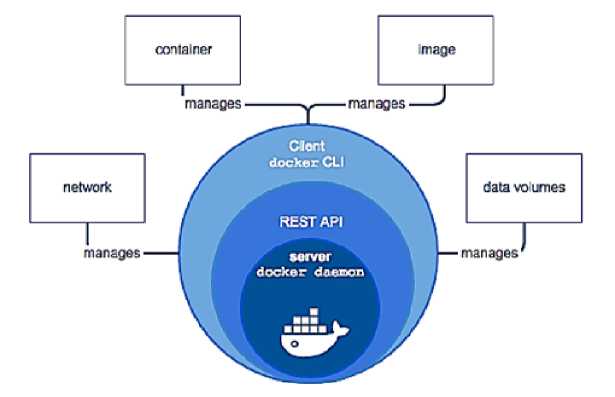
Figure 1. Components of Docker Engine ( Docker, 2024 )
Docker architecture
The Docker architecture is based on the client-server model and defines the operation and relationships of the basic Docker components. In Figure 2, the connections between individual components in the client-server architecture are shown. The client and daemon may or may not be on the same server; as needed, the client can be connected to the daemon remotely.
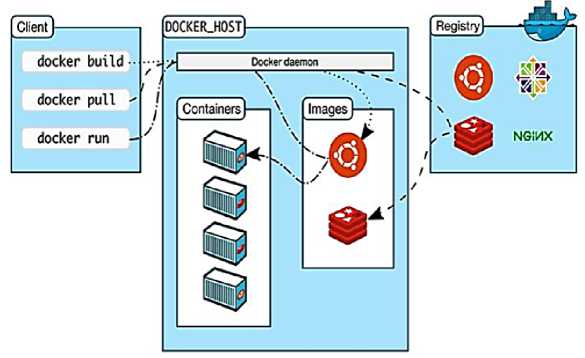
Figure 2. Docker architecture ( Kumar, 2024 )
The Docker client is the primary means of user interaction with Docker. Using commands via the command-line interface, the client forwards them to the Docker daemon over an API. The daemon is a server process that runs continuously in the background, monitors the REST API for incoming command processing requests, and executes them. Software images for Docker must be stored at a specific loction for easy access. This location is called the Docker registry. Docker Hub is an example of a public registry that anyone can use, and Docker is configured by default to use Docker Hub. However, users can use their private registry as needed.
Docker objects
Objects include images, containers, services, and volumes. Objects are primarily generated by the Docker daemon. On the other hand, images are read-only system files containing instructions for creating a container that can run an application. A Dockerfile contains simple commands executed by the daemon to create and run images. Each command in the Dockerfile creates a separate layer within the image.
When we modify the Docker file to change the image, only those layers containing the change are affected. This is the main reason why images consume much fewer resources than virtual machines.
When we talk about containers in the context of applications and software, we can compare them to the real shipping containers. Before being standardized, shipping goods was a demanding and costly process. Depending on the type of goods and the shipping method used, it was necessary to adjust the packaging method. Standardizing containers balanced the way goods are shipped, regardless of type, shape, size, and mode of transport. The amount of work was reduced with the simplification of the process, leading to significant time and cost savings ( Jangla, 2018 ).
A similar principle applies to software containers. We have an image that is run inside the container, and the container only includes what is necessary to run the application. We can then transport and run this container anywhere. Instead of installing the entire operating system and all the accompanying software, the container typically contains only the following components: the application itself, necessary libraries, components on which the application depends (dependencies), as well as configuration files and folders (shown in Figure 3). The application thus becomes independent of the type of operating system distribution and infrastructure on which it is run.
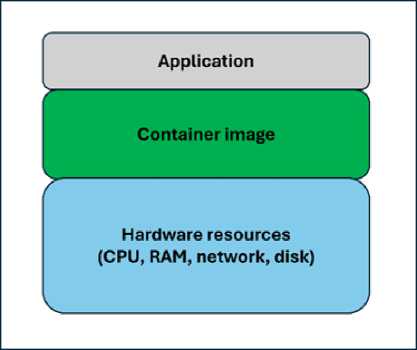
Figure 3. Architecture of a container
Containers are often associated with, or even confused with, the concept of virtual machines. Virtal machines run within a virtualization software and actually represent separate operating systems within the host. Therefore, they have their own libraries and programs, but also occupy several gigabytes of memory space ( Shih et al, 2021 ). On the other hand, containers are essentially just isolated environments within the host operating system and they contain their own libraries for specific processes and applications, making them much smaller when stored in memory ( Kul et al, 2024 ). Below in Figure 4 is a diagram illustrating the technical differences between virtual machines and containers ( Jones, 2018 ).
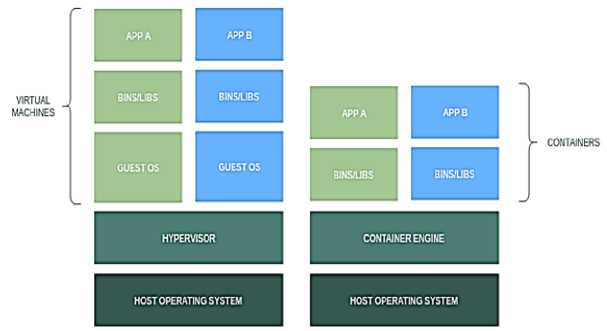
Figure 4. Containers vs. virtual machines
Services allow users to scale containers across multiple Docker instances. In this way, multiple containers can work together via the Docker API and exchange data among themselves to perform a task. To the end-user, it will appear as if all the work is being done by a single application.
Docker Hub
Docker Hub is the primary location for hosting Docker Images. It is a cloud-based public registry on which images can be stored and from which they can be pulled. It serves as a centralized distribution and discovery point for images. Users can buy or sell images on Docker Hub, or distribute them for free. Images can be searched using either the Docker Hub interface or the CLI.
WebRTC web application
WebRTC is a free open-source project that provides web browsers and mobile applications with real-time communication via the application programming interface (API). It enables audio and video communication within web pages, allowing direct peer-to-peer communication, and eliminating the need for installing plugins or downloading native applications ( WebRTC Code Samples, n.d. ).
The project is a web-based application that enables the establishment of video calls using We-bRTC open-source code. Architecturally, the web application is implemented using containers hosted on Microsoft Azure. As part of the application, a user registration and login portal has also been developed, enhancing the application’s security. The application code is freely available to all interested parties. The goal of developing such an application is to contribute to the community by allowing users to reduce their communication costs without investing in the development of similar applications. It will primarily help smaller companies and businesses that do not have enough resources or manpower to spend time on developing the application. The developed WebRTC platform can be integrated into any application that has a developed API interface. Architecture of the WebRTC application is shown in Figure 5.
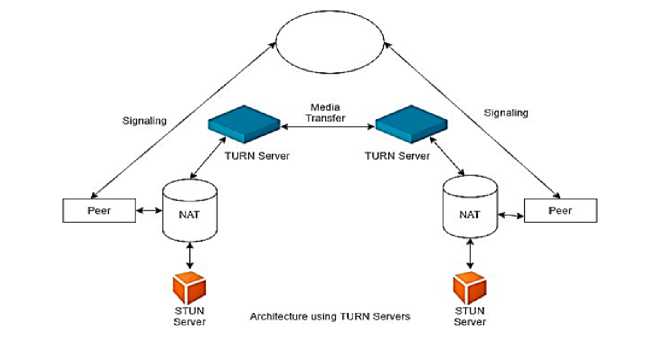
Figure 5. Architecture of the WebRTC application ( The Past, Present, and Future of WebRTC, 2022. )
WebRTC is an open-source project that enables real-time audio, video, and data communication via web and native applications. In our project, we have utilized a portion of WebRTC for voice communication.
WebRTC has several JavaScript APIs, out of which the most popular ones are:
-
• getUserMedia: enabling the use of input functions (camera and microphone);
-
• MediaRecorder: audio and video recording;
-
• RTCPeerConnection: audio and video streaming between users;
-
• RTCDataChannel: data streaming between users.
For a WebRTC web application to work properly, we need a signaling service, commonly referred to as signaling or „signaling server“ ( Signaling and Video Calling - Web APIs | MDN, 2024. ). WebRTC uses RTCPeerConnection for streaming data communication between browsers, but a mechanism for coordinating communication and sending control messages is also required. WebRTC does not specify signaling methods and protocols. As part of this project, we can use Socket.IO for message exchange, but there are other alternatives. For a WebRTC application to establish a call, its clients must exchange the following information: session control messages for opening or closing communications, error messages, media metadata (codecs, codec settings, bandwidth, and media types), key data for establishing secure connections, and network data (i.e., host’s IP address and port as seen by the external side of the network) ( Almousa et al, 2021 ).
The signaling process requires a mechanism for clients to exchange messages back and forth. This mechanism is not implemented by the WebRTC API itself but must be created independently. We-bRTC is designed to operate on a peer-to-peer connection basis, allowing users to connect in the most direct way possible. However, WebRTC is built to support the latest networking technologies, meaning that client applications can traverse NAT gateways and firewalls if peer-to-peer call establishment fails. Call encryption is mandatory for all WebRTC components, and its JavaScript APIs can only be used in secure communication via Hypertext Transfer Protocol Secure (HTTPS) connection.
Application design
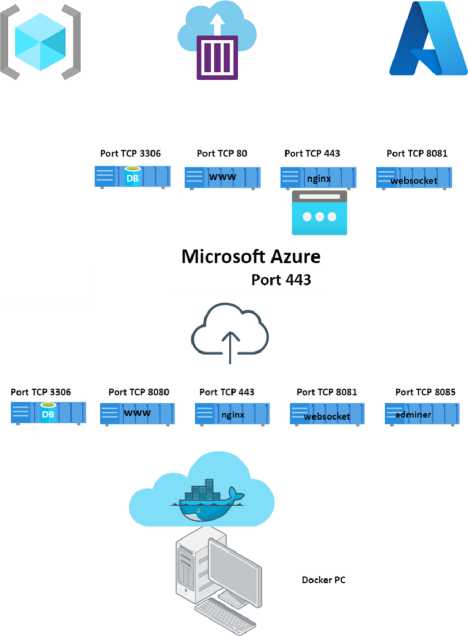
The following image (Figure 6) shows a schematic representation of Docker containers on a local computer and the Microsoft Azure platform.
Development platform
Figure 6. Design of the WebRTC application
WebRTC application is completely free and can be downloaded with the accompanying code on GitHub ( Alenkamis, 2022. ). The application on Microsoft Azure consists of four containers (“DB”, “Websocket”, “Nginx”, and “www”), and one Linux virtual machine.
The DB container is a part of the web application where a MySQL database, necessary for the website, is located. Within the DB container, a database named “web” has been created. Inside the “web” database, there is a table called “users”, where users who register on the web application are stored. The websocket container is a part of the web application that provides support for working with websockets, since the PHP programming language does not natively support the WebRTC platform. Due to excellent native support for websockets, Node.js was used for the message exchange microservice between components, thereby avoiding undesired effects. The configuration for websockets in Node.js consists of the server-side and client-side parts. The server-side configuration is located in the “websocket” container, while the client-side configuration is located in the “www” container. The www container is crucial for the web application because it contains the Apache server. From the Docker configuration files, it can be concluded that the website is located in the /var/www/html folder. The following files, necessary for the operation of the web application, are located inside the html directory: call.php , functions.php , index. php , login.php , logout.php , registration.php , script.js , and socket.io.js . The Nginx container serves as the frontend web server that users first encounter when accessing the WebRTC application. Upon connection attempt, users connect to the Ngnix Web server via TCP port 443, which is a standard for HTTPS sessions. A Let’s Encrypt certificate is implemented directly on the container to prevent users from encountering errors when opening the application ( Ardi et al, 2025 ).
The following image (Figure 7) depicts the entire operation of the WebRTC application, from accessing the website to establishing a VoIP call to another user.
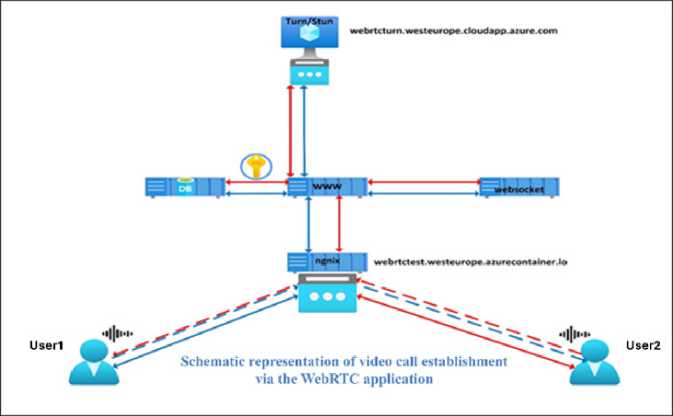
Figure 7. Schematic representation of video call establishment via the WebRTC application
Results of WebRTC application performance testing
The development of the WebRTC platform on Docker infrastructure has opened the possibility of measuring and testing performance across three different systems. The first system is a developed platform based on bare-metal infrastructure (Ubuntu Server 22.04 version), the second platform is a virtual server (Ubuntu Server 22.04 version), and the third is the WebRTC platform on Docker infrastructure.
All measurements were conducted on the same server with identical specifications: Dell PowerEdge R660, Intel Gold 6139 processor, 256 GB RAM, 4 x 1.92 TB SSD disks, and 2 x 10G network adapters. Performance measurements were carried out using iPerf and nPerf software tools, which provide the necessary capabilities.
iPerf is a powerful tool that allows the testing of network throughput, latency, and packet loss within a mesh network. iPerf enables the generation of network load to assess the maximum data transfer speed and identify potential network bottlenecks ( Garcia et al, 2017 ). This tool provides detailed reports and measurement results, allowing us to identify and resolve issues in the application’s operation ( Yadav et al, 2018 ).
nPerf is a tool that also tests data transfer speed and latency within the application to gain insight into its performance. nPerf provides detailed results that help analyze connection quality and identify potential problems. Whether in the implementation, maintenance, or optimization phase of the application, nPerf can help in the better understanding of its performance and quality improvement ( Marinković et al, 2021 ).
The research and WebRTC application testing results are presented in the following table (Table 1). It provides insight into application performance after each type of test given in the table is applied across three different platforms.
Table 1. Results of WebRTC application performance testing on three different platforms
|
Type of test |
Bare-metal WebRTC |
Virtual server WebRTC |
Docker platform WebRTC |
|
Initial application deployment (minutes) |
120 |
35 |
6 |
|
Application startup (seconds) |
106 |
41,2 |
7 |
|
System restart (seconds) |
120 |
50 |
11 |
|
Application response without any calls (milliseconds) |
89,3 |
67,1 |
17,6 |
|
Application response with 5 concurrent sessions (milliseconds) |
102,4 |
77,5 |
21,2 |
|
Application response with 10 concurrent sessions (milliseconds) |
124,2 |
88,9 |
24,7 |
The following graph (Figure 8) shows the loads in application response during a specific number of calls, with the values expressed in milliseconds.
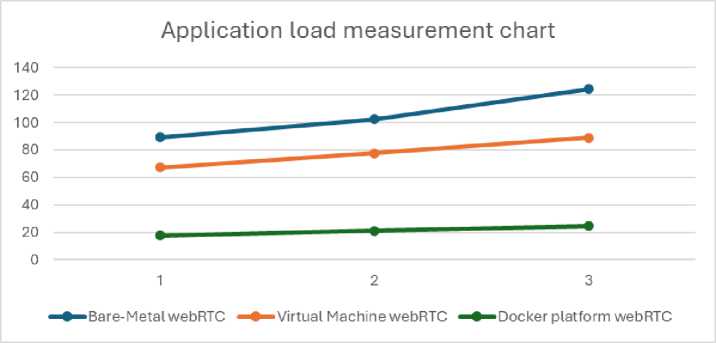
Figure 8. Application load measurement chart
Using Laplace’s matrix and Hertz’s formulas for loads (without startup and deployment data), we arrive at the application performance results showing that the bare-metal platform (physical) is convincingly the slowest, while the virtual machine platform is 24.8% faster than it. However, ultimately, it can be said that the Docker platform is the fastest in the test and has the best performance, being 81.3% faster than the bare-metal platform and 72.3% faster than the virtual one.
WebRTC Integration within the E-Learning System
The developed WebRTC application has been successfully integrated into our existing e-learning system, enabling secure, real-time communication between instructors and students. The application uses Web Real-Time Communication WebRTC technology, which allows direct peer-to-peer exchange of audio and video data within a web browser, without the need for additional plugins or software. This approach enables instructors to communicate with students in real time, as well as interact with each other, significantly enhancing the interactivity of lessons and supporting dynamic educational processes. Furthermore, students can communicate among themselves, which further promotes collaboration, teamwork, and the collegial exchange of knowledge.
In the professional literature, WebRTC is increasingly recognized as a superior technology for real-time communication compared to traditional infrastructures based on virtualization or physical servers, due to its peer-to-peer architecture and low latency. Peer-to-peer communication allows direct data exchange between end users, significantly reducing the load on central servers and infrastructure, which contributes to faster and more efficient media transmission ( Mahmoud and Abozariba, 2024 ).This approach does not require complex virtualized or physical server infrastructures, minimizing latency and improving user experience, particularly in real-time scenarios such as video calls and interactive discussions.
Because of these advantages, WebRTC is increasingly used in modern educational platforms and communication systems, as it combines low latency, scalability, and efficient use of network resources without the need for large server farms or complex virtualized environments ( Mahmoud and Abozariba, 2024 ). In our case, the platform is already integrated into the e-learning system and enables immediate and smooth interaction between instructors and students, as well as among students themselves, significantly improving the quality of the learning process and supporting reliable real-time communication.
Conclusions
The work briefly describes the mechanisms of Docker infrastructure and explores the operation of the created WebRTC-based application for VoIP and video communications. WebRTC is an open-source platform, and as such, it is very interesting for use. The goal of developing this application is to contribute to the community by enabling users to reduce their communication costs, without investing in the development or purchase of similar applications. Primarily, it will assist smaller companies that lack sufficient resources and manpower needed for their development.
The infrastructure of the application is built on the Docker container platform. This platform emerged in 2013 and immediately became a popular choice for development environments. Docker as a platform is increasingly being used for production systems due to the convenience of microservices. It has its advantages in terms of: a quick application startup, segmentation features that make it less susceptible to attacks, and the facilitation of simplified repairs and servicing. After testing the performance of the proposed WebRTC-based application with varying degrees of network load and using different types of tests, we have obtained the results in favor of the Docker platform implementation. It has by far shown the best performance under any type of test, whether it be the time needed to deploy the application, or its response to an increasing number of concurrent sessions (calls).
In conclusion, it is expected that the Docker container platform will continue to progress and grow in the future, and that in the coming years many applications will be based on this platform. We sincerely hope that our diligent work on this highly performant VoIP application will reach end users who will gladly use it in the future.
Acknowledgements
The authors thank the managements of Alfa BK University and MB University for their support in the research process and technical preparation of the manuscript.
Funding
This research did not receive any specific grant from funding agencies in the public, commercial, or not-for-profit sectors.
Conflict of interests
The authors declare no conflict of interest.
Data availability statement
The data supporting the reported results in this study are contained within the article itself.
Institutional Review Board Statement
Not applicable.
Author Contributions
Conceptualization, A.K., A.Z. and B.I.; methodology, A.K. and M.B; software, AK, B.I. and A.Z.; formal analysis, A.K., G.P. and L.C.J.; writing—original draft preparation, A.K., M.B. and A.Z.; writing—review and editing, A.K, and L.C.J. All authors have read and agreed to the published version of the manuscript.